
Recording-flow goal
Financial messages are usually written in everyday language:
Pay 35,000 for lunch from CASH
Receive a 2,500,000 freelance payment into BCA
Move 500,000 from BCA to CASH
The spreadsheet needs structured data: date, description, amount, category, cashflow type, source account, destination account, and sometimes a relationship with an earlier transaction.
Hermes connects those forms through this flow:
message
  → metadata
  → rule selection
  → draft
  → confirmation
  → write
  → read-back
The spreadsheet remains unchanged at the draft stage. The user can review Hermes' interpretation before granting permission.
Metadata defines the rules
Rules, categories, and accounts come from the active Financial Planner. Hermes does not rely on conversational memory to decide which choices are valid.
Required metadata includes:
- accounts;
- categories;
- cashflow rules;
- date and amount formats;
- destination sheet;
- available rows;
- transaction references needed by specific rules.
Actual rule and field names still follow spreadsheet metadata. The tables below explain behavior so readers can understand money direction and required fields.
Five cashflow rules
Every transaction must map to one clear rule.
| Rule | Example | Money direction | Main fields |
|---|---|---|---|
| Expense / Spending | Paying for lunch | Leaves an account | amount, category, From Account |
| Income | Receiving payment | Enters an account | amount, category, To Account |
| Transfer | Moving a balance | One account to another | amount, From Account, To Account |
| New receivable | Lending money | Leaves an account and becomes a receivable | amount, category, From Account, related party |
| Receivable repayment | Receiving money owed | Enters an account and reduces a receivable | original transaction, To Account, repayment amount |
A message may contain several transactions, but each transaction still needs exactly one rule. If intent is ambiguous, Hermes should ask before preparing the draft.
Expense or Spending
This rule applies when money leaves an account to purchase a product or service.
Buy lunch for 35,000 from CASH
Important fields:
Cashflow: Spending
Amount: 35,000
Category: Makan/minum
From Account: CASH
To Account: empty
The source account is required because its balance decreases.
Income
This rule applies when money is received as income.
Receive a 2,500,000 freelance payment into BCA
Important fields:
Cashflow: Income
Amount: 2,500,000
Category: <category-from-metadata>
From Account: empty
To Account: BCA
The destination account is required because its balance increases.
Transfer
A transfer moves a balance between accounts without creating new income or expense.
Move 500,000 from BCA to CASH
Important fields:
Cashflow: Transfer
Amount: 500,000
From Account: BCA
To Account: CASH
Both accounts are required and must be different. Cashflow reporting must not count a transfer as income or expense.
New receivable
This rule applies when money is lent to another person.
Lend Andi 500,000 from BCA
Important fields:
Cashflow: New receivable
Amount: 500,000
From Account: BCA
Related party: Andi
Category: valid receivable category
Money leaves the account but becomes an amount expected back. The related party is needed so repayment can be matched later.
Receivable repayment
This rule applies when the related party repays an earlier receivable.
Andi repays 500,000 into BCA
Hermes needs to find the original receivable. With one clear match, the draft can use:
Cashflow: Receivable repayment
Amount: 500,000
To Account: BCA
Category: inherited from original receivable
Reference: Andi receivable transaction
A receivable repayment is not new income. If the original transaction is missing or several candidates exist, Hermes must ask for clarification.
Spending-draft example
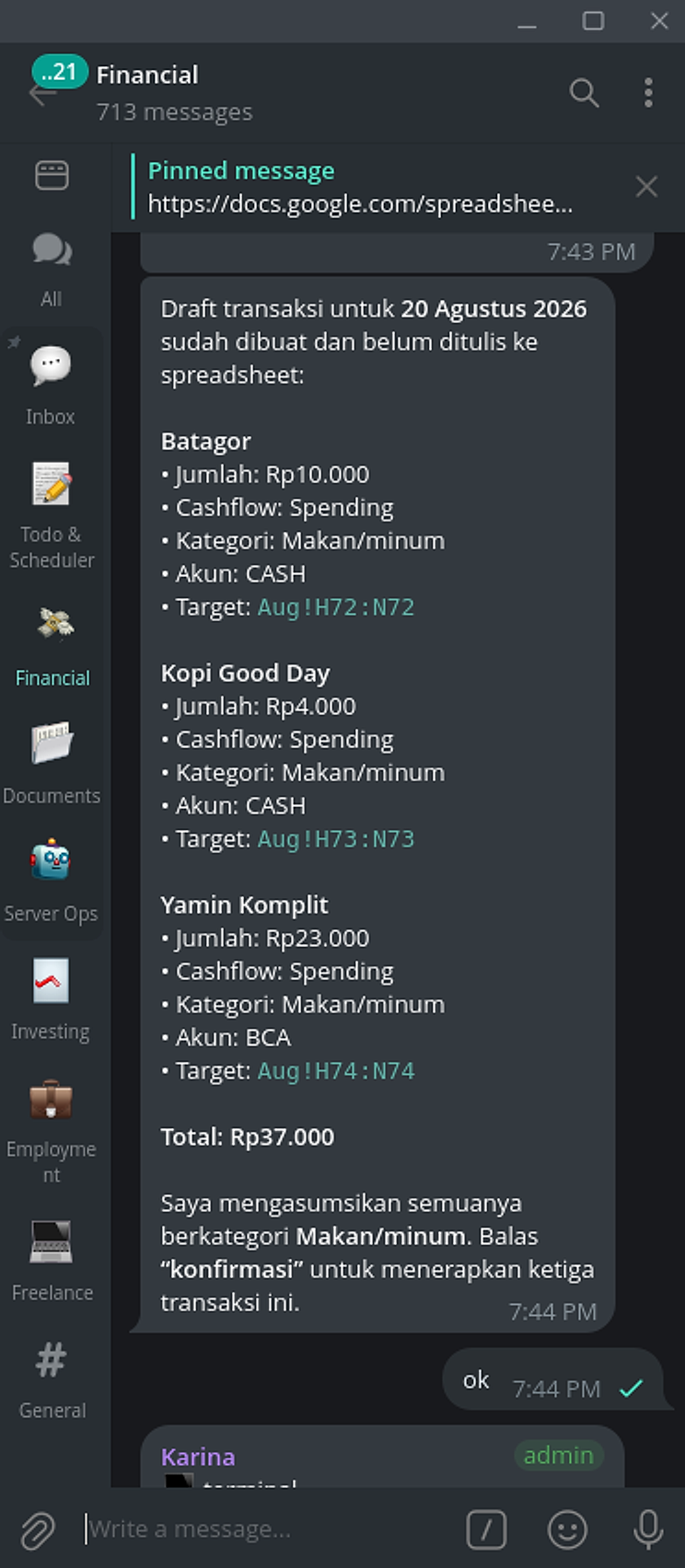
The screenshot shows three transactions using the Spending rule:
| Transaction | Amount | Category | Source account | Destination row |
|---|---|---|---|---|
| Batagor | Rp10,000 | Makan/minum | CASH | Aug!H72:N72 |
| Kopi Good Day | Rp4,000 | Makan/minum | CASH | Aug!H73:N73 |
| Yamin Komplit | Rp23,000 | Makan/minum | BCA | Aug!H74:N74 |
The draft total is Rp37,000. The spreadsheet remains unchanged while Hermes waits for konfirmasi (“confirm”).
This example shows that transactions using the same rule can still use different source accounts.
Draft content for each rule
A draft needs to expose the fields that determine rule behavior.
| Rule | What must be visible before confirmation |
|---|---|
| Expense / Spending | category, amount, source account |
| Income | category, amount, destination account |
| Transfer | amount, source account, destination account |
| New receivable | amount, source account, related party, category |
| Receivable repayment | original transaction, amount, destination account |
Beyond rule fields, every draft should show the date, description, transaction count, total amount, and destination rows.
Confirmation applies only to the displayed draft. If any field changes, Hermes must prepare a new draft and request confirmation again.
Writing and verification
After confirmation, the spreadsheet tool writes the same data shown in the draft. Each transaction goes to its planned destination row.
A successful API response is not enough. Hermes reads the rows back and compares:
- date;
- description;
- amount;
- cashflow rule;
- category;
- source and destination accounts;
- receivable reference when applicable.
If one transaction fails, the overall result is partial. Hermes must not turn two successful rows into a claim that the entire batch completed.
Hermes component roles
The finance skill controls rule selection, required fields, and the confirmation lifecycle. The spreadsheet tool handles data access. The Hermes session connects the original message, draft, approval, and verification result.
Credentials and spreadsheet IDs remain in Hermes configuration or secret storage rather than the article, repository, or confirmation message.
Main principle
Good recording is more than turning a message into a spreadsheet row. Hermes needs to choose the correct rule, expose money direction, request approval for relevant fields, and verify the write.
The five rules preserve the difference between money leaving, money entering, balance movement, receivable creation, and receivable repayment. Without those distinctions, a financial report can be numerically plausible while semantically wrong.